School Fee Payment
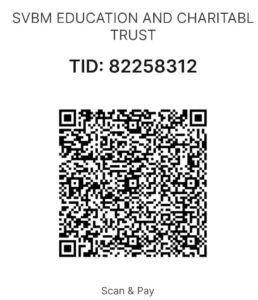
Welcome to the school fee payment page. Parents and guardians can use the QR code provided below to pay school fees conveniently through their preferred UPI payment app.
Pay your fees in three simple steps
Please follow these steps carefully when making your school fee payment.
Scan the QR Code
Use your preferred UPI payment app to scan the official school payment QR code shown below.
Verify & Pay
Check the recipient's name and enter the correct fee amount before confirming the payment.
Keep Your Receipt
Save your payment confirmation or transaction ID for future reference.
Pay Your School Fee
Quickly & Securely
To pay your school fees, scan the QR code below using your UPI payment app and complete the transaction. Please verify the recipient's name and payment amount before proceeding.
Inform the School Management
After completing your payment, kindly inform the school management and share your payment receipt or transaction ID so the payment can be verified. Please keep the confirmation until your payment has been acknowledged.
For payment-related questions or assistance, please contact the school management. Always verify payment details before confirming a transaction.
Important Payment Notice
Complete Your Payment
Please scan the next QR code to complete your payment. Once the transaction is successful, kindly inform the school management and keep your payment receipt for reference.